The Inventory repost can be accessed from the Inventory section on the Profill Portal
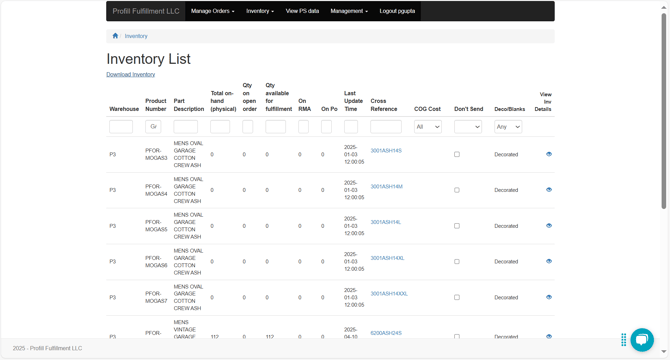
You can view the following attributes/columns on the Inventory list page -
- Warehouse - This is the warehouse identification where the stock is available. It can either be P3, P7 or PB.
- Product Number - This is the product identifier or SKU
- Product description - Brief description of the product
- Total on hand (Physical) - This shows the quantity of a product that is in stock.
- Qty on open order - This number denotes the quantity of a product that has been ordered across orders.
- Quantity available for fulfillment - This is the difference between Total on hand quantity and Qty on open order. If this value is negative, then that indicates that the SKU is not in stock but has been mentioned in an order.
- On Po - On Po means on purchase order. This simply means that the SKU has be ordered for re-stocking. The number denotes the quantity that has been ordered
You can download the Inventory list by clicking on download inventory CTA. If you do not want all the inventory but just related to a program, you can filter the list with the existing attributes and then download it.
In the downloaded report there is field named external mapping. This mapping can help you if you want to find a product with your SKU number.